How Benchling Credits work
Benchling AI brings AI-powered features, agents, and models directly into the Benchling platform so scientists can accelerate their everyday R&D workflows. Some Benchling AI features are included with your subscription at no additional cost. Agents and models use a credit system — and to ensure every team can start using AI right away, credits are included with every Benchling subscription.
In this article, you'll learn:
What Benchling Credits are: Understand what credits represent and how they work.
How Included Credits are determined: See how many credits your team receives based on your plan.
How credit consumption works: Learn how many credits each AI run uses.
How to manage credits: Learn how to monitor usage across your tenant and prepare for upcoming purchasing options.
How to purchase additional credits: Explore options for increasing your credit allocation.
What are Benchling Credits?
Benchling Credits give your team access to Benchling's AI-powered agents and models. Credits are consumed each time you complete an AI run. The number of credits used depends on the type of run you perform.
Each month, credits are allocated to your tenant for all provisioned users to consume. This monthly allocation resets on the first of each month and cannot be rolled over to the next month. When your tenant's credits are exhausted, users will no longer be able to access AI-powered agents and models until credits refresh the next month. Your account team can help with capacity planning to ensure your organization has enough credits for the entire team without hitting monthly limits.
Included Credits
Most Benchling subscriptions include credits at no additional charge. The number of Included Credits your tenant receives each month is based on the number of Authorized Users on your plan.
Number of Authorized Users | Benchling Credits per month |
1–5 | 1,000 |
6–10 | 2,000 |
11–15 | 3,000 |
16–25 | 5,000 |
25+ | 10,000 |
Included Credits are available with all editions of Benchling Bioresearch, Benchling Bioprocess, and Benchling for Startups. Credits are not included with In Vivo or PipeBio subscriptions.
Credit consumption
Benchling Credits are consumed for each AI run (also referred to as Service Runs). The number of credits used varies based on the type of run. You can always check the current rates for each type of run in the Credit Rate Card below.
An AI run is considered completed unless a technical error prevents the request from being processed. If a technical error occurs, no credits will be deducted.
Credit Rate Card
The table below shows the number of credits consumed per AI run, as of February 11, 2025. Rates are subject to change — Benchling will always provide at least 30 days' notice before making updates.
Agent / Model | Credits per run |
Ask Agent | 10 |
Compose Agent | 25 |
Data Entry Agent | 50 |
Deep Research Agent | 100 |
Structure Prediction Model | 100 |
Generative Protein Model | 500 |
The rate card published on this page supersedes any other rate cards, printed or otherwise, and governs in case of conflict.
Manage Benchling Credits
Benchling AI is provisioned and managed through the Tenant Admin Console. From there, admins can control which users have access to Benchling AI and access to individual agents. Users who have been granted access can use Benchling AI directly within their existing Benchling interface as long as credits are in the tenant — no additional setup or separate login required.
To manage AI access:
Open the Tenant Admin Console
Navigate to Settings
Open the AI Settings section
From here, you can provision or remove access for individual users and configure which agents are available to your team.
You will be able to view your tenant’s monthly credit consumption at any time, with a breakdown of usage. You’ll be able to see your currently used credits for the month versus the total available (which is a combination of your Included Credits plus any Purchased Credits). Additionally, you will be notified by email when your consumption reaches 75%, 90%, and 100% of your available credits.
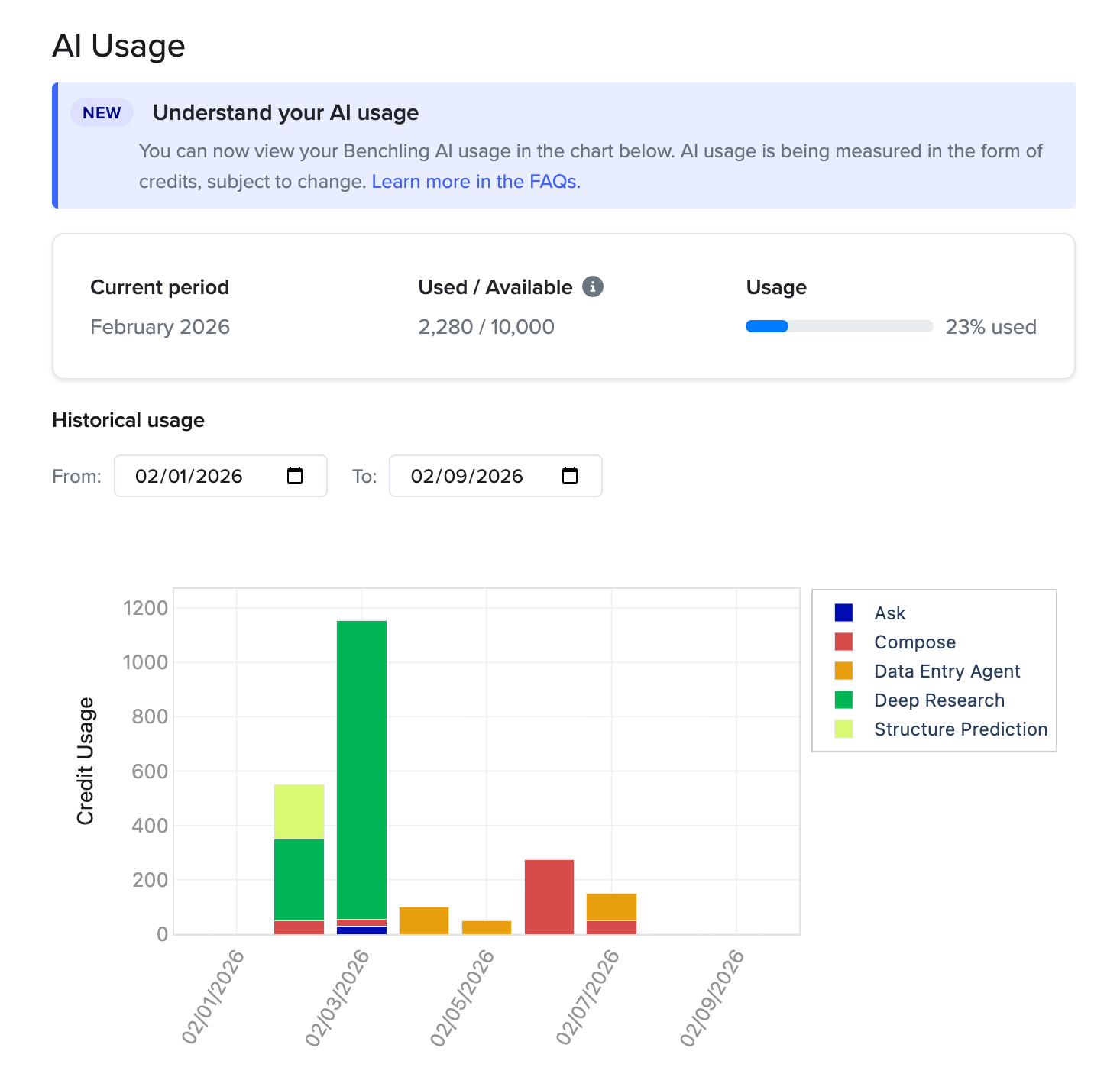
These tools can help ensure that your R&D organization has enough credits at all times. Your account team can help with capacity planning to ensure your organization has enough credits for the entire team without hitting monthly limits.
Note: individual users will NOT be able to see the available credits for the entire tenant.
Purchase additional credits
If your team needs more credits than what's included with your subscription, you can purchase additional credits through a Benchling Credit Subscription.
With a Benchling Credit Subscription, your tenant receives a set number of Purchased Credits each month during the term of your subscription. After purchase, your monthly credit balance — including both Included Credits and Purchased Credits — refreshes to the full amount on the first of each month.
You can increase the size of your Benchling Credit Subscription at any time via a change order to a sales order. If you increase the number of credits in your plan, the change takes effect immediately.
Subscription plans are noncancelable. Both plans and credits are nonrefundable.
Frequently asked questions
Credit basics
What Benchling products include credits?
All editions of Benchling Bioresearch, Benchling Bioprocess, and Benchling for Startups include Benchling Credits at no additional charge. The number of credits depends on how many Authorized Users are on your plan.
When do credits reset?
Credits reset automatically on the first of each month.
Do credits roll over?
No. Unused credits expire at the end of each month and cannot be rolled over to subsequent periods.
What happens when I run out of credits?
When your tenant's Benchling Credits are exhausted, users will no longer have access to AI-powered agents and models until additional credits are added to the account. You can purchase additional monthly credits at any time through a Benchling Credit Subscription.
Are credits shared across users?
Yes. Benchling Credits are allocated at the tenant level, meaning all Authorized Users on your tenant draw from the same pool of credits.
Credit consumption
How do I know how many credits an AI run will use?
Each AI run in Benchling AI is clearly marked with a selection option and/or button in the user interface. You can check the Credit Rate Card above to see the current cost for each AI run before you execute it.
What if an AI run fails due to a technical error?
If a technical error prevents your request from being processed, no credits will be deducted.
What if an AI run completes but the results aren't what I expected?
Credits are consumed for any completed AI run, even if the results don't meet your expectations. An AI run is considered completed as long as it is processed without a technical error. Benchling provides Help articles, technical guides, workshops, and enablement options to identify best practices and help customers develop their use cases.
Will credit rates change over time?
Benchling reserves the right to update the Credit Rate Card at any time. Any changes will be communicated with at least 30 days' written notice.
Disputes
Can I dispute credit consumption?
After 30 days, unless a logged request is disputed, the associated consumption is considered final. If you believe credits were consumed in error, contact Benchling support within 30 days of the AI run.