See all benchmarks

BenchBench-Data Import

Tests whether AI agents can take a scientist’s request and attached files and correctly structure the data.

Leaderboard

Agent results

Mean score and 95% confidence interval across three runs.

Task Design

BenchBench-Data Import Construction

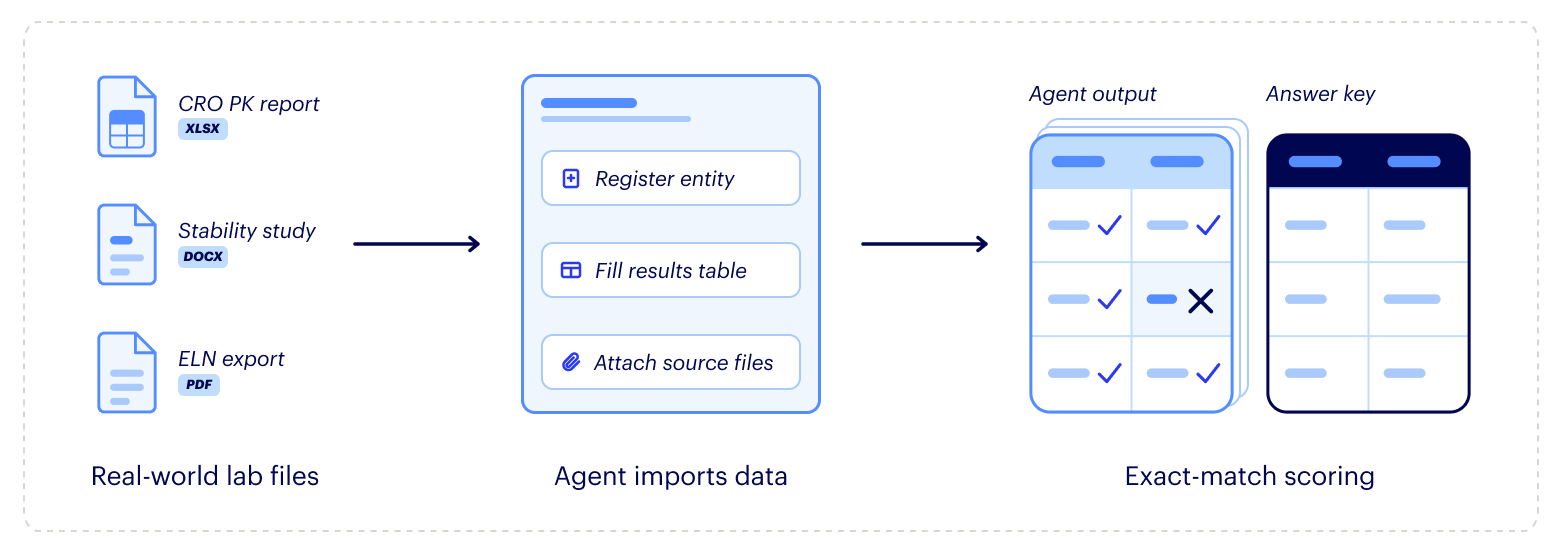
Each task gives the assistant a real world request from a scientist, along with the files they’d attach, and checks whether the data ends up in Benchling correctly.

How a task works: real-world lab files, such as a CRO PK report, a stability
                study and an ELN export, go to the agent, which registers entities, fills results
                tables and attaches source files in Benchling. Its output is then scored by exact
                match against an answer key.
Failure modes

Where agents go wrong

Examples of how agents fall short when importing and structuring data.

01

Missing, extra, or misplaced data

The agent leaves out required rows, adds rows outside the requested scope, or writes data into the wrong table.

ExampleThe agent entered all six animal PK results correctly but left the required study group table empty.

02

Incorrect values or formatting

The agent enters the wrong value, leaves a required field blank, or uses a format the evaluator doesn’t accept.

ExampleThe agent placed two compounds in well B2 instead of B3 and left their quantity of 20 blank.

03

Mishandling column mapping

The agent maps data to the wrong columns, merges columns that should be separate, or labels them incorrectly.

ExampleAll 192 assay rows were correct, but the agent merged three separate columns into one.
About the data

Built by Benchling

We create every BenchBench benchmark with scientific experts, drawing on thousands of real-world experiments.

Explore more research from Benchling: 2026 Biotech AI Report