How Benchling credits work
Benchling AI brings AI-powered features, agents, and models directly into the Benchling platform so scientists can accelerate their everyday R&D workflows. Some Benchling AI features are included with your subscription at no additional cost. Other AI capabilities like Scientific AI Models and select AI capabilities are priced on a credit system. To ensure every team can start leveraging the power of AI right away, a set number of baseline credits are automatically included with every customer’s Benchling subscription at no additional cost.
In this article, you'll learn:
What Benchling credits are: Understand what credits represent and how they work.
How included credits are determined: See how many credits a team receives based on their plan.
How credit consumption works: Learn how credits are consumed for different AI capabilities and models.
How to manage credits: Learn how to monitor usage across a tenant and prepare for upcoming purchasing options.
How to purchase additional credits: Explore options for increasing your team’s credit allocation.
What are Benchling credits?
Benchling credits is the measurement system that gives teams access to AI-powered capabilities and models on Benchling. Teams can use credits to accomplish AI powered workflows and drive insights from their data. Consumption of credits is aligned to the complexity of work being done, explained further in the rate card below. Benchling has also partnered with leaders in AI allowing teams to utilize Benchling credits within those systems through a credit conversion process. If a team needs help determining how many credits they might need, Benchling is here to support with capacity planning and AI strategy to ensure every organization has what it needs to succeed without interruptions.
Included credits
We believe every scientist should have access to AI, that’s why every core* Benchling subscription includes a baseline number of credits at no additional cost. Baseline credits and any additional credits purchased are allocated monthly and do not roll over to future months. Once a team exhausts their monthly credits, they will not be able utilize Benchling AI capabilities that consume credits, until they purchase additional credits or the next month’s credit allocation refreshes.
Even once credits are fully exhausted in a monthly period, teams will continue to have access to all previous AI runs, associated data and AI features which do not consume credits.
The number of included monthly credits is based on the number of authorized users on the plan.
Number of authorized users | Benchling credits per month |
1–5 | 1,000 |
6–10 | 2,000 |
11–15 | 3,000 |
16–24 | 5,000 |
25+ | 10,000 |
*Please note: Credits are not currently included for In Vivo or PipeBio customer subscriptions.
Credit consumption
Benchling credits are consumed when you use Benchling AI agents and models or convert credits into third party AI agent or model access.
Credit consumption methodology: Credits are consumed as a fixed rate or variable rate depending on the capabilities used, or on a third party conversion and all are outlined in the rate card below.
Variable rates: Credit consumption is based on the complexity of work completed for each AI run. Simple tasks consume less credits and more complex multi-workflow tasks consume more. See some examples in the table below.
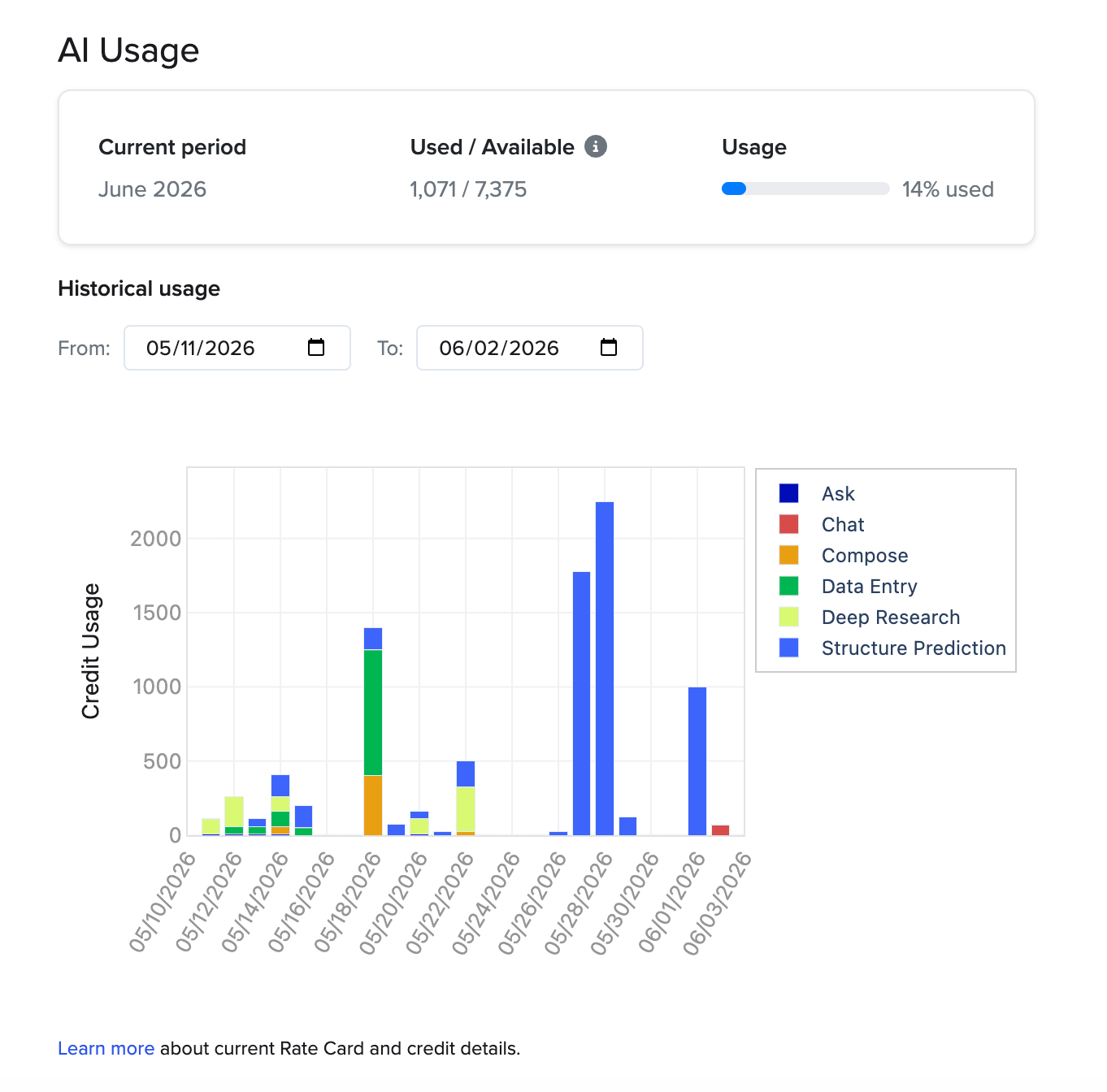
Monitoring credit consumption: Tenant admins can monitor their AI credit consumption within the Tenant Admin Console. Here they can view the amount of credits used and understand how they’re tracking against their total monthly credit allocation. We’ll send automated emails to tenant admins as teams approach their monthly limit to ensure admins can effectively manage their organization’s AI needs.
Partner AI credit consumption: We’ll show specific credit rates when converting Benchling credits into the cost system of our partners’ AI capabilities. Benchling credits will be consumed at the time they are converted into our partners’ cost system for their AI capabilities.
Variable credit consumption examples
Below are variable credit consumption examples. Note that fixed credit rate consumption is only accessed through the “legacy agent” functionality found via the “+” icon in the main chat interface.
Example | Typical Steps | Credits Consumed |
Write a complex, multi-step report or analysis Example Prompt: Create a preclinical report analyzing study ST043. | Searches and reads many notebook entries Queries warehouse tables Calculates statistics and produces graphs/charts Generates figures showing study design Compiles multi-page report or slide deck | High |
Aggregate data and build a graph or chart Example Prompt: Make a chart of the purity data for lots of antibody AB079
| Searches registry Queries warehouse tables Produces graphs/charts | Medium |
Get quick answers or summaries Example Prompt: Summarize the treatment groups in study ST075. | Searches and reads a notebook entry | Low |
Credit rates
The tables below show how Benchling credits are consumed as of August 18, 2026. The rates published on this page supersede any other rate, printed or otherwise, and govern in case of conflict. Benchling reserves the right to update rates at any time. Any material rate increases will be communicated by Benchling with at least 30 days' written notice.
Variable rates are based on the complexity of work being done and will correlate to the amount of credits consumed. As AI capabilities mature and evolve, similar prompts may slightly vary in rates between runs.
Some AI capabilities and Scientific Models are set at a fixed rate. If a technical error occurs while a user is attempting to use Benchling AI, no credits will be consumed. Otherwise Benchling credits will be consumed at the time of use.
AI Capabilities
AI Capability | Credits Consumed |
Chat Agent | Variable per run |
Data Entry | 50 |
Scientific AI Models
Model Category | Credits Consumed |
Structure Prediction Model | 25 |
Property Prediction Model | 5 |
Partner Credit Conversions [A]
Partner | Credit Conversion Rate |
Boltz API utilization | Rate displayed at time of conversion |
[A] Partner conversion rates between Benchling credits and the associated partner’s balance is shown in Benchling at the time of conversion. Following conversion, the partner’s balance is consumed by the partner’s rates and practices. All converted credits are reflected within the AI usage chart within the Tenant Admin Console.
Legacy Agents [B]
Legacy Agent | Credits Consumed |
Ask | 10 |
Compose | 25 |
Deep Research Agent | 100 |
[B] Legacy agents are not available for all accounts. Only accounts with prior Benchling AI usage (before June 3, 2026) have access to legacy agents at this time. The new Benchling AI experience combines the abilities of legacy agents and adds additional capabilities, making them even more powerful. Legacy agents will sunset in the future and we’ll notify impacted customers ahead of time.
Managing Benchling AI
Benchling aims to provide transparency and autonomy for teams to manage their AI usage. Benchling AI is provisioned and managed through the Tenant Admin Console.
Tenant admins can control which users have access to Benchling AI and the capabilities they can use. The amount of credits an account is consuming can be tracked in the Tenant Admin Console. Users who have been granted access by their admin can use Benchling AI directly within their existing Benchling environment; no additional setup or separate login is required. Only tenant admins will be able to view tenant level credit consumption or modify AI access.
To manage AI access as a tenant admin:
Open the Tenant Admin Console and navigate to Settings
Open the AI Settings section
From here, access can be provisioned for the whole tenant, or granted or removed for individual users.
To view credit consumption as a tenant admin:
Open the Tenant Admin Console and navigate to Settings
Open the AI Usage section
From here, a chart is displayed outlining the usage Benchling credits at a tenant level segmented by type of usage (agent, model type, partner conversion, etc.)
Purchasing additional credits
If a team needs more credits, they can purchase additional credits through a Benchling credit subscription.
With a Benchling credit subscription, a tenant can purchase a set number of credits each month during the term of their Benchling subscription. After purchase, the monthly credit balance refreshes to the full amount on the first of each month.
Teams can increase the size of their credit subscription at any time via a change order to a sales order. All credit increases take effect immediately.
Subscription plans are non-cancelable. Both plans and credits are nonrefundable.
Frequently asked questions
Credit basics
What Benchling products include credits?
All editions of Benchling Bioresearch, Benchling Bioprocess, and Benchling for Startups include Benchling credits at no additional charge. The number of free issued credits depends on how many authorized users are on the plan.
When do credits reset?
Credits reset automatically on the first of each month.
Do credits roll over?
No. Unused credits expire at the end of each month and cannot be rolled over to subsequent periods.
What if a credit subscription is purchased mid-month?
Credits purchased will be allocated as their full monthly amount at the time of purchases. Meaning if a Benchling credit subscription is started midway during the month, that month will have the entire month’s allocation of credits. Credits will not be pro-rated for mid-month purchases.
Are credits shared across users?
Yes. Benchling credits are allocated at the tenant level, meaning all authorized users on your tenant draw from the same pool of credits.
Credit consumption
What if an AI run fails due to a technical error?
If a technical error prevents your request from being processed, no credits will be deducted. For partner AI capabilities that you access after converting credits, how technical errors are handled is determined by the partner. What if an AI run completes but the results aren't what I expected?
Credits are consumed for any completed AI run, even if the results don't meet your expectations. An AI run is considered completed as long as it is processed without a technical error.
What happens if I interrupt an agent run after submitting?
Interruption of a run in this scenario applies to clicking the “stop” button after submitting a prompt using the new Chat interface experience. If you click the “stop” button, credits may still be consumed for the work that was done before the interruption was registered. Any credits consumed will be reflected in your AI usage chart within the Tenant Admin Console. Please know that no additional credits will be consumed after the initial interruption point.
Disputes
Can I dispute credit consumption?
After 30 days, unless a logged request is disputed, the associated consumption (including any conversion) is considered final. If you believe credits were consumed in error, contact Benchling Support within 30 days of the applicable consumption date.