Benchling Automation closes the loop from instrument to insight
Instrument data still moves by hand. A scientist runs a machine, downloads the file, cleans up the numbers, and copies the results into another tool. That manual work only compounds as data volume grows.
It also holds back AI. MIT’s 2025 State of AI in Business report found 95% of enterprise AI pilots fail to deliver measurable returns, and in R&D, data is usually the rate-limiting step. This happens when results sit in silos or in spreadsheets that someone needs to hunt down. Working pilots need structured, connected data underneath.
Benchling Automation builds that foundation, starting at the instrument. It captures instrument data, structures it, and links each result to the samples and experiments behind it, so the data is ready for analysis and AI. This year’s updates build on three key pillars: a connected lab, a structured data foundation, and agentic intelligence.
Capture data from 200+ instrument models automatically
Benchling Automation captures, parses, and standardizes instrument data automatically, linking each result to the samples and experiments that produced it, so scientists spend less time on manual entry and rework.
This happens in three ways. Common instruments connect through a pre-built connector library based on Allotropy, Benchling’s open-source instrument data library. Anything outside the library goes through a configurable data pipeline, using point-and-click transformations or custom code. PDFs and images go through Benchling AI.
The library covers instrument categories that show up across R&D:
Category | Examples |
|---|---|
Liquid chromatography | Empower, Chromeleon, Unicorn |
Plate readers | SoftMax Pro, Envision, Gen5 |
Cell counting | Vi-Cell XR, Cellometer |
Cell culture analyzers | BioProfile FLEX, Nova Flex |
Flow cytometry | FACSDiva, FlowJo |
Spectrophotometry | NanoDrop, Lunatic |
qPCR | QuantStudio, CFX Maestro |
Binding affinity | Biacore |
Liquid handlers | Biomek, Hamilton VENUS, Opentrons Flex |
Automated workcells | HighRes CellarioOS |
Data historians | AVEVA PI |
Some of these instrument connectors now support two-way connections, enabling Benchling to both read from and send to them. That supports multi-cycle feedback loops with liquid handlers and workcells, so results can flow back mid-run. Together, these bring connected lab instruments directly into the experiment. Benchling Automation supports 200+ instrument models and 70+ API and file-based connectors, so it works across whatever vendors a lab already runs. You can find the full library here.
Plan, run, and analyze plate-based assays at scale
Scaling a plate-based assay used to mean hand transfers and spreadsheet calculations for every plate. Now a plate map is designed once, reused, and connected directly to instruments, so the system can execute transfers across source and destination plates and analyze results without manual intervention.
That same automation extends further with multi-cycle workflows, including expression, extraction, and quantification with standard-curve interpolation and normalization. These register new entities and write concentrations back as they’re generated. Connect robotic workcells, and it captures transfers and results the moment each run happens.
One canvas from instrument to analysis: Automation Designer
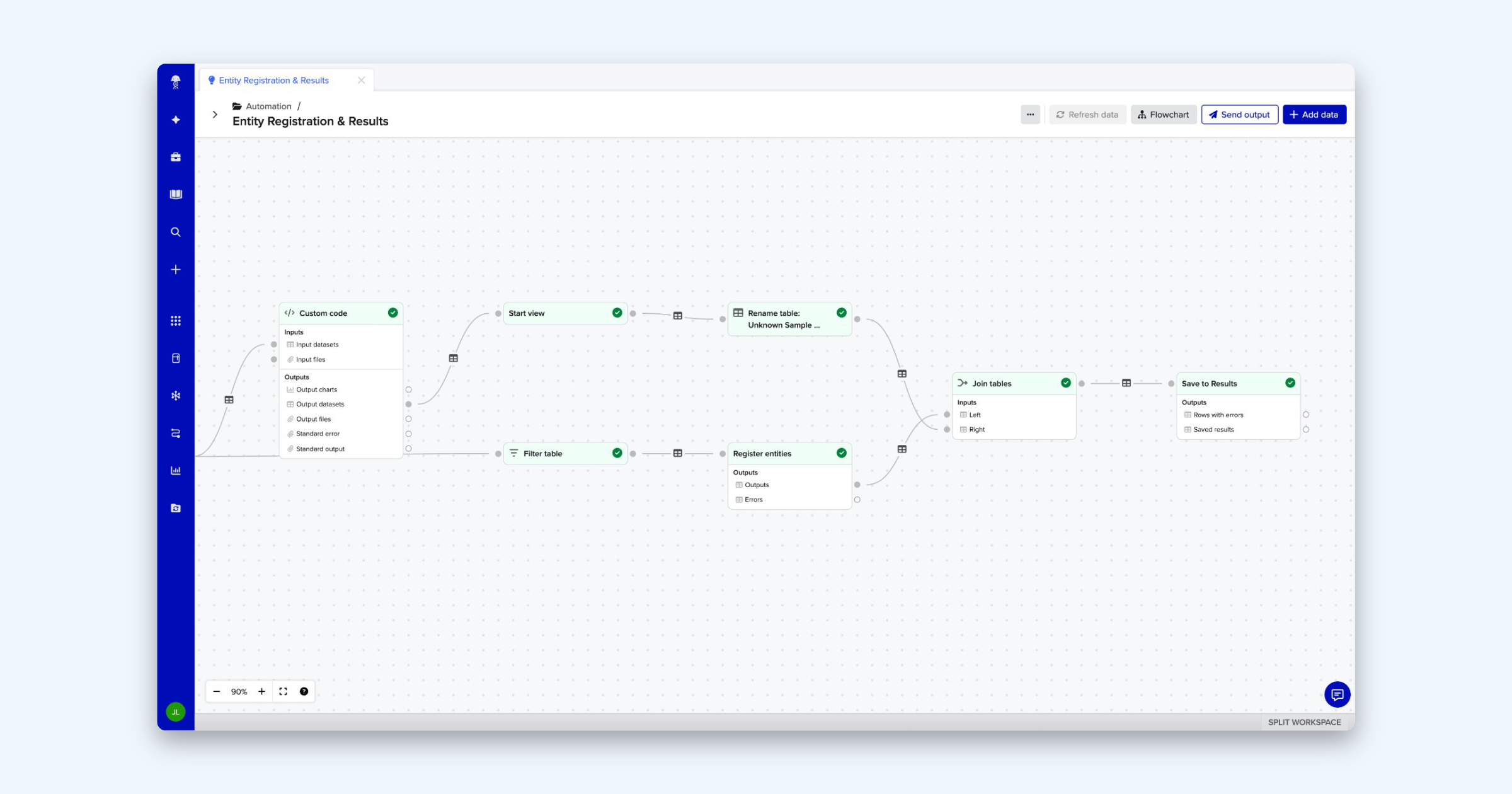
Getting clean data in is half the job. Automation Designer is a point-and-click canvas that runs a workflow from instrument to analysis in one traceable place, so scientists see their whole process in a single view. Most steps need no code because they’re built from a library of pre-built processing and analysis blocks. You can also describe a workflow in plain language and let Benchling AI build the configuration. When a step needs more, Custom Code brings Python into Benchling Automation for custom parsing, statistics, or visualization, with 10+ packages pre-installed for common workflows. Every configuration saves as a reusable template teams can share.
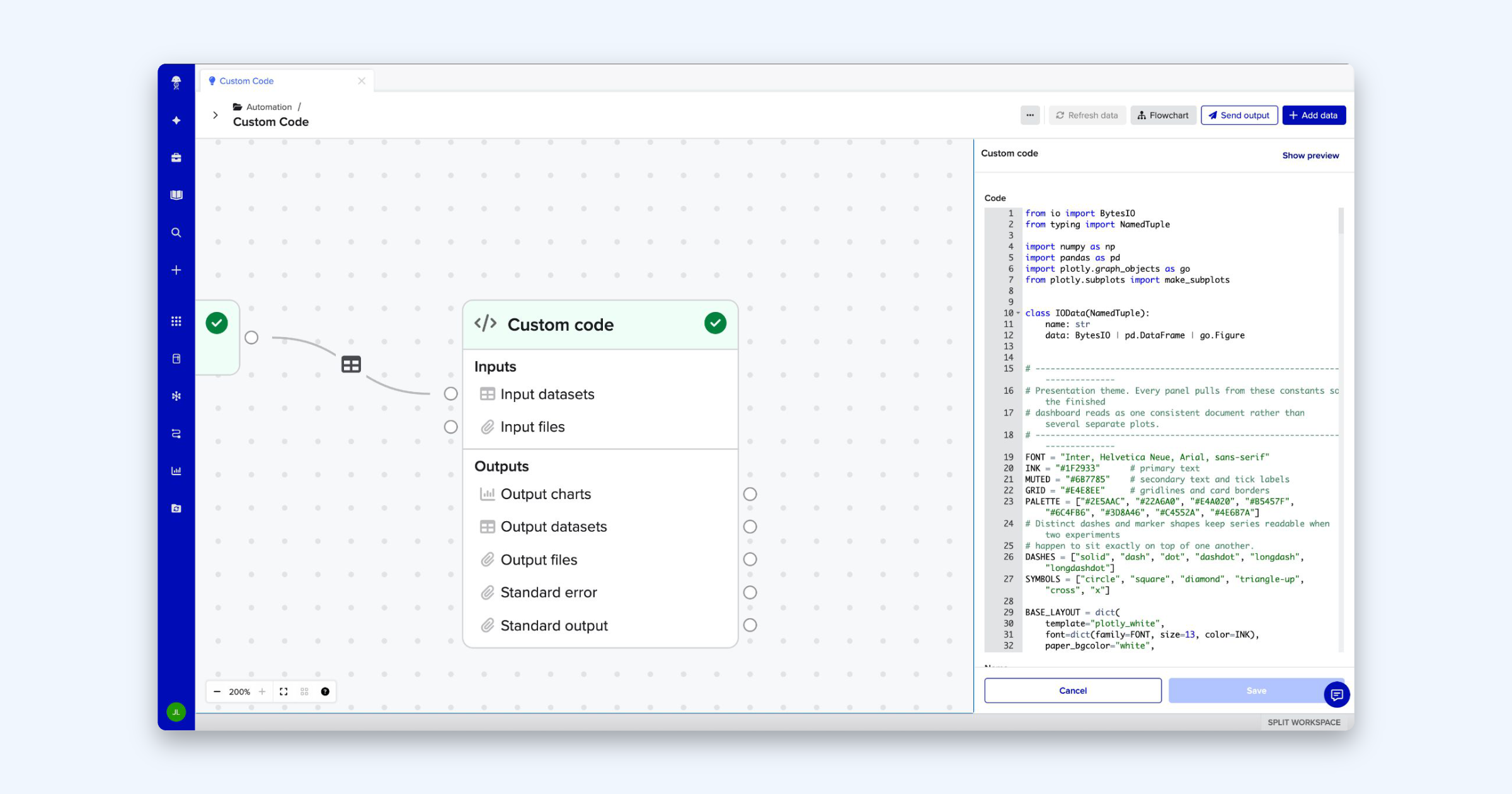
Automation Designer also writes back to the system of record. Results are linked to the samples and experiments that produced them, and you can create new Registry entities or update existing ones straight from an analysis. Apply transformations or filtering within Automation Designer first, then send the output where it belongs. Build that once, and it runs the same way on every run after that.
Improve governance with automation templates
None of this works if teams can’t trust what’s running. Automation templates start as drafts: safe to build, test, and edit before anything goes live. A dry run checks the logic without real effects, so teams can iterate freely until the template is ready. A person reviews and publishes every template before it runs, and publishing locks it in place for a reproducible, auditable process.
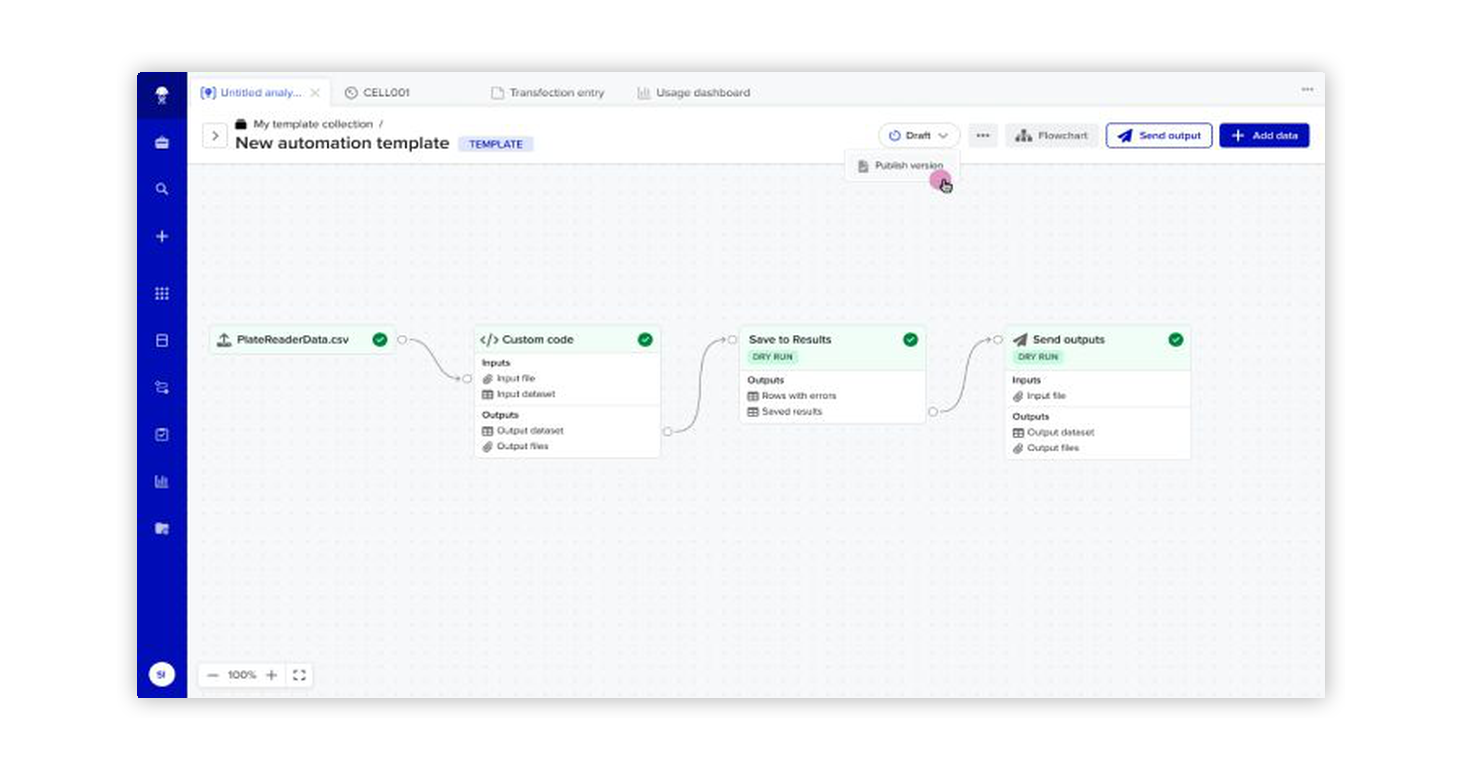
From a single file to a connected workcell, on one platform
Not every workflow needs a robot. On any given day, one scientist might upload a single plate reader file by hand while, down the hall, a workcell runs hundreds of plates overnight. Benchling Automation is built for that range. As work gets more complex, teams don’t need to switch to a different tool. They can simply expand their workflows on Benchling and keep all the data they’ve already captured.
Take a protein quantification assay, for example:
Upload and analyze: A scientist uploads a plate reader CSV, fits a standard curve, and interpolates concentrations. The analysis is saved alongside the experiment it came from.
Connect the instrument: The reader file syncs into Benchling automatically, a connector parses it, and results and entities are registered without anyone retyping a number.
Orchestrate the lab: A HighRes workcell runs the reader, Automation Designer calculates normalization volumes, and a liquid handler normalizes the plate. Concentrations are written back to inventory as they’re generated.
Let AI build it: The scientist describes the workflow in plain language, and Benchling AI drafts the automation template. A person reviews, tests, and publishes it before it runs.
Let AI run it: A background agent detects the new file and starts the right automation without anyone pressing start.
At every stage, it’s the same assay, the same data model, and the same record. What changes is how much of the work runs on its own, while a scientist approves and makes the final decisions.
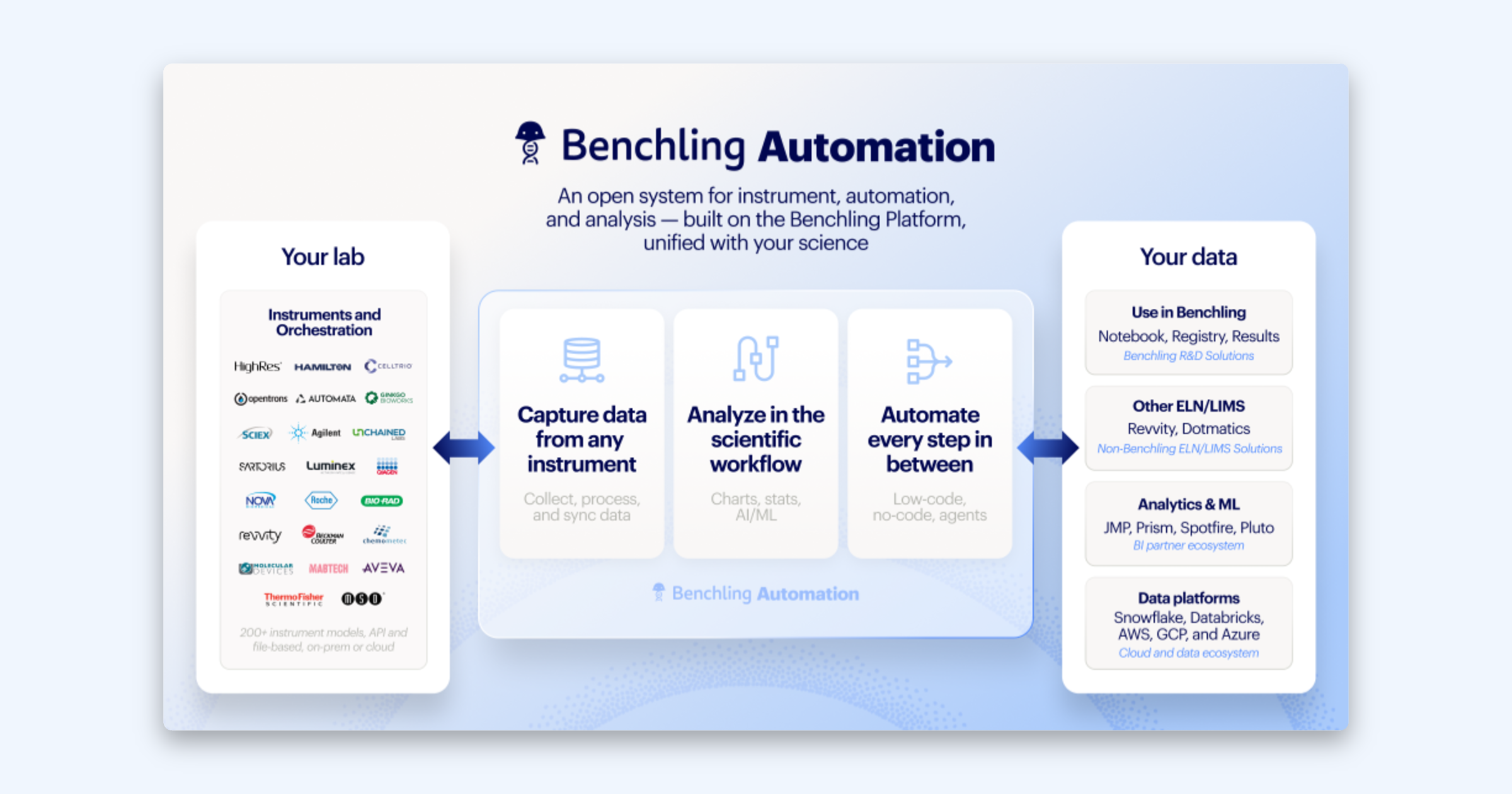
Clean data at the instrument pays off across the lab
Benchling Automation closes the gap between instrument and insight, and that pays off across teams.
Scientists get their time back. Results flow straight from instruments into Benchling, so there’s no manual data entry and no transcription errors forcing reruns. Across a portfolio, that means programs stay on schedule and data integrity improves.
IT and automation engineers stop building and maintaining one-off pipelines. Automation provides configurable, reusable integrations with full traceability from instrument to record, so filings and audits rest on a complete, defensible data trail.
Data scientists start with data that’s already structured and in context. Less time cleaning and wrangling means faster projects and stronger models.
R&D leaders gain cross-project and portfolio visibility, so they can make data-driven decisions that accelerate discovery.
Talk to your account team about Benchling Automation, or request a demo to see it in action.